
Looking to try YouLearn AI? Use promo code SAVE15 for 15% off the Pro plan.
When my study group first mentioned YouLearn AI, I was pretty skeptical. “Great, another AI tool,” I thought. But after using it for three weeks to help with my coursework, I’ve changed my tune. This platform has genuinely made a difference in how I process information from lectures, PDFs, and YouTube videos.
If you’re drowning in course materials and looking for a way to make sense of it all, this review might help you decide if YouLearn is worth your time (and potentially your money).
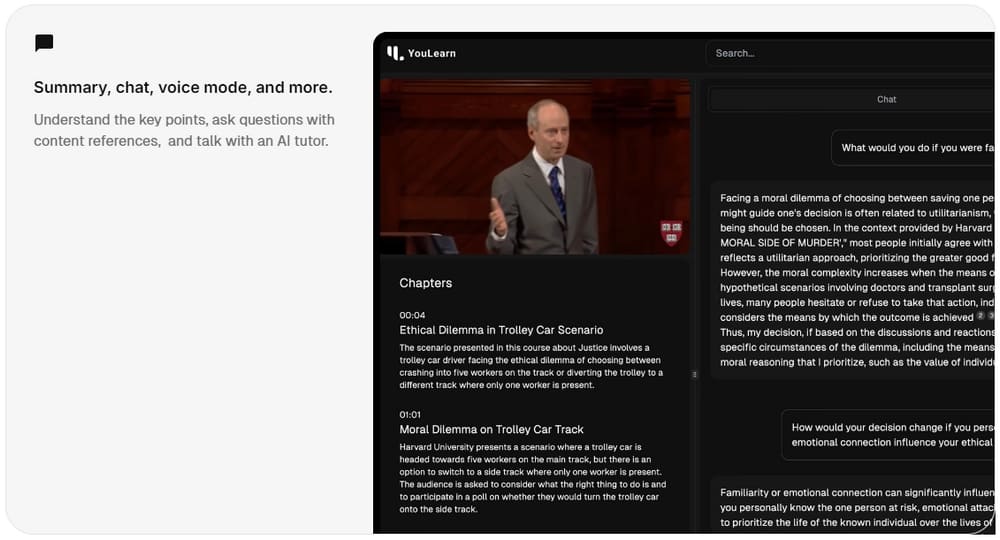
Is Youlearn AI Free?
Yes, YouLearn offers a free tier that’s actually useful, unlike some “free” services that are essentially just demos. Here’s what you get with the free plan:
- 2 AI chats per day
- Up to 3 PDF uploads or YouTube links daily
- PDF size limit of 120 pages/20MB per file
- 1 recorded lecture per day
- 10 study guide answers daily
- Limited access to the voice mode beta
For casual use or to test the waters, the free plan works well. I used it for about a week before deciding to upgrade.
The limits are reasonable – I found that 2-3 chats per day was enough to get through specific questions about my coursework, though not ideal for deep dives into complex topics.
Youlearn AI Founder
YouLearn was founded by Advait Paliwal, a Computer Science senior at Michigan State University’s College of Engineering. What’s interesting is that Paliwal created this while still being a student himself, which might explain why the tool feels like it was designed by someone who actually understands student pain points.
Unlike some founders who create educational tech without classroom experience, Paliwal seems to have built YouLearn to solve problems he was facing himself. This shows in the product’s focus on practical features rather than flashy gimmicks.
Youlearn AI Review
What Makes YouLearn Stand Out
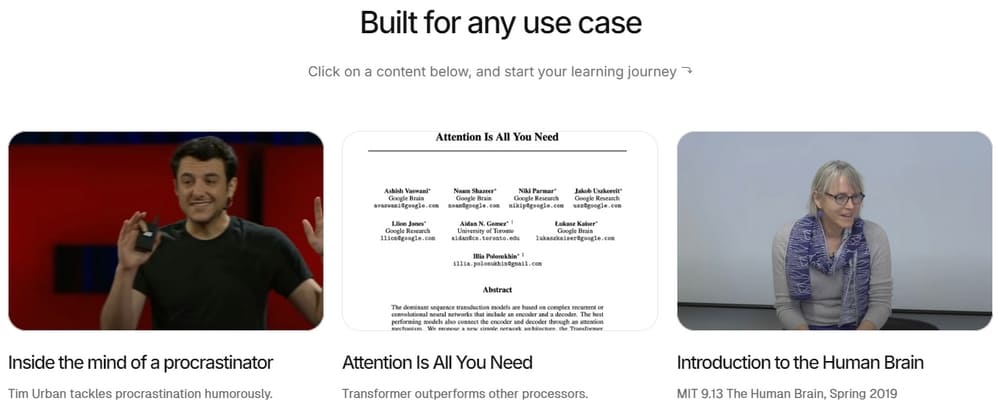
After using various AI study tools, I’ve found YouLearn’s standout feature is its ability to understand and organize content from different formats. Here’s a breakdown of what works well:
Content Processing
YouLearn handles multiple formats surprisingly well. I tested it with:
- Dense research PDFs (it handled a 78-page neuroscience paper without issues)
- YouTube lecture videos (it extracted key points from a 90-minute economics lecture)
- Recorded lectures (uploaded an audio recording from class)
The platform breaks content down into logical sections, making it easier to navigate through long materials. For YouTube videos, the transcript extraction is especially helpful – I could search for specific topics mentioned in hour-long videos.
AI Conversations
The chat feature is where YouLearn really shines. Unlike generic AI chatbots, YouLearn responds with references to your specific materials. When I asked about concepts from my uploaded neuroscience paper, it could point to specific sections and explain them in simpler terms.
The context awareness means you’re not just getting general information – you’re getting explanations tailored to the exact content you’re studying.
Flashcards
The automatic flashcard generation saved me hours of manual work. After uploading lecture notes for my statistics class, YouLearn identified key concepts and created flashcards that I could review later.
What I appreciated was the ability to edit these cards – some were spot on, others needed tweaking, and some I deleted entirely. This semi-automated approach strikes a good balance between saving time and maintaining quality.
Voice Mode
The voice mode (still in beta) is convenient when you’re multitasking. I found myself using this while reviewing notes and making dinner – just asking questions and getting audio responses.
It’s not perfect (occasionally misunderstands technical terms), but it’s a nice option when you can’t type.
Room for Improvement
No tool is perfect, and YouLearn has its limitations:
- File Format Restrictions: It only works with PDFs, YouTube videos, and recorded lectures. No support for PowerPoint slides or images containing text.
- Depth of Analysis: For very technical subjects (I tested it with quantum physics), the explanations sometimes become too simplified.
- Organization Options: There’s limited ability to organize materials into folders or create relationships between different documents.
- Mobile Experience: The mobile interface works, but feels less polished than the desktop version.
Despite these drawbacks, the core functionality delivers on its promise to make learning more efficient.
Youlearn AI Alternative
The main competitor I’ve tried is UPDF AI Online, which is more focused on PDF handling than comprehensive learning. It offers similar AI chat features but lacks some of YouLearn’s education-specific tools.
Other alternatives include:
- Quillbot AI: Better for rewriting and summarizing, but doesn’t handle multi-format content
- Notion AI: Great for organizing notes but doesn’t process videos
- Claude or ChatGPT: Powerful for general questions but lack the content-specific understanding
If your primary need is PDF analysis, UPDF might be sufficient. But for a true learning assistant that handles multiple formats, YouLearn currently has an edge.
Youlearn AI Pricing
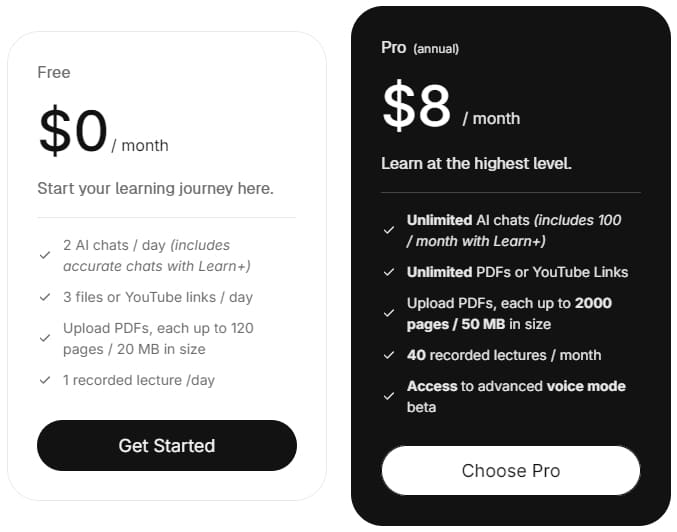
YouLearn offers two pricing tiers:
Free Plan: $0/month
- Limited usage as described above
Pro Plan: $8/month (annual billing) Features:
- Unlimited AI chats (including 100/month with Learn+)
- Unlimited PDF uploads and YouTube links
- Larger file size limits (2000 pages/50MB per file)
- 40 recorded lectures per month
- Unlimited study guide answers
- Full access to voice mode beta
I initially thought $8/month seemed steep, but considering I was paying for separate tools for video summarization and flashcards, it actually saved me money to consolidate everything in YouLearn.
There’s also been mention of a $20/month plan, but this appears to have been an earlier pricing model that’s been adjusted downward to the current $8/month.
Youlearn AI Promo Code
Currently, you can use the promo code SAVE15 to get 15% off the Pro plan. This brings the monthly cost down to about $6.80 when billed annually.
I’d recommend starting with the free tier for a week or two before deciding if the upgrade makes sense for your study habits.
FAQ
Q: How accurate are the summaries and flashcards?
A: In my experience, about 80-90% accurate for general subjects. For technical content, they sometimes miss nuance but catch the main points.
Q: Can I upload handwritten notes?
A: Not directly. You’d need to scan them as a PDF first, and even then, the recognition might be spotty.
Q: How does it handle math equations?
A: Basic equations are recognized, but complex formulas can sometimes be misinterpreted. For heavy math content, you might need to provide additional context in your questions.
Q: Is my data secure?
A: According to their privacy policy, uploaded content is processed for your use only and not shared with third parties. However, like most AI tools, your uploads are likely used to improve the system.
Q: Can I use YouLearn offline?
A: No, it requires an internet connection to function.
Q: Does it work for languages other than English?
A: It handles major languages reasonably well, but the best performance is with English content.
Final Thoughts
YouLearn AI isn’t a magic bullet for learning, but it’s one of the more thoughtfully designed AI learning tools I’ve tried. The ability to process and connect information across different formats (PDFs, videos, lectures) sets it apart from single-purpose tools.
For students overwhelmed with content or professionals trying to digest large amounts of information, it’s worth at least trying the free tier. The Pro upgrade makes sense if you find yourself bumping against the free limits regularly.
What I appreciate most is that it feels designed to enhance study habits rather than replace them. It doesn’t do the learning for you – it just makes the process more efficient by helping you focus on understanding rather than organizing.
If you decide to give it a try, start with a small PDF or video to see how it handles your specific subject matter before uploading your entire course library.
This review reflects my personal experience with YouLearn AI as of March 2025. Features and pricing may change over time.
Ready to streamline your learning experience? Try YouLearn AI for free today and see if it works for your study style. Remember to use code SAVE15 for 15% off if you decide to upgrade to Pro.